Design
Text & typography
Edit text, style runs and use fonts that export correctly.
Text in Shippp is real text: it wraps, reflows with smart layout and exports as HTML text with your text styles. This page covers editing text, styling it and choosing fonts that work in production.
Add and edit text
- Press T and click to type, or drag to create a fixed-width text box.
- Double-click a text layer, or press Enter, to edit it. Press Esc to finish.
- Select part of the text to style just that run — for example one bold word or a link color.
The Typography section
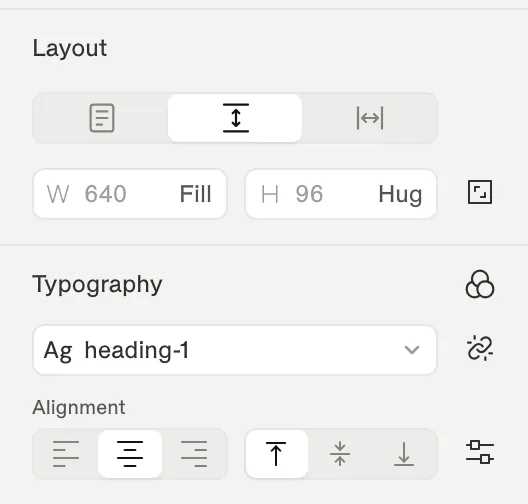
| Control | What it does |
|---|---|
| Text styles | Apply a text style from your design system, create a new one, or Detach text style. |
| Font, weight, size | The font family and its weight and style, and the font size. |
| Line height, letter spacing | Vertical rhythm and tracking. |
| Alignment | Horizontal alignment, and vertical alignment inside the text box (top, middle, bottom). |
| Text resizing | Whether the box hugs the text or keeps a fixed width or height. |
More text options
Open More text options for typographic details. The Basics tab has decoration (underline, strikethrough), case (Uppercase, Lowercase, Capitalize, Small caps), Truncate with an ellipsis and Max lines, and Wrap style (Auto, Pretty, Balance). The Details tab has OpenType features: numbers, figures, fractions, slashed zero, ordinals and paragraph indent.
Tip
Fonts
The font picker groups fonts by where they come from:
| Group | Details |
|---|---|
| In this file | Fonts already used in the file. |
| Google Fonts | The full Google Fonts catalog. Works everywhere and exports without extra setup. |
| System | Fonts every operating system has. |
| On this device | Fonts installed on your computer. Needs Chrome or Edge on desktop. Nothing is uploaded. |
Device fonts and export
Missing fonts
When a file uses a font your browser can't load, Shippp shows a Missing fonts dialog. Choose Replace with… to swap it everywhere in one step.
Use text styles
For anything that repeats — headings, body text, captions, labels — use a text style instead of setting values by hand. Text styles can change per breakpoint, so a heading can be 48 px on Desktop and 32 px on Mobile with a single style. See Text styles.